How to use Azure OpenAI in BoltAI
Connect a model you deployed in Azure OpenAI and chat with it in BoltAI.
Written By Daniel Nguyen
Connect a model you deployed in Azure OpenAI and chat with it in BoltAI. Each Azure OpenAI provider in BoltAI connects to one deployment.
Before you start
From your Azure OpenAI resource in the Azure portal, you need:
- The resource name.
- An API key for the resource.
- The name of a model deployment.
Set up Azure OpenAI in BoltAI
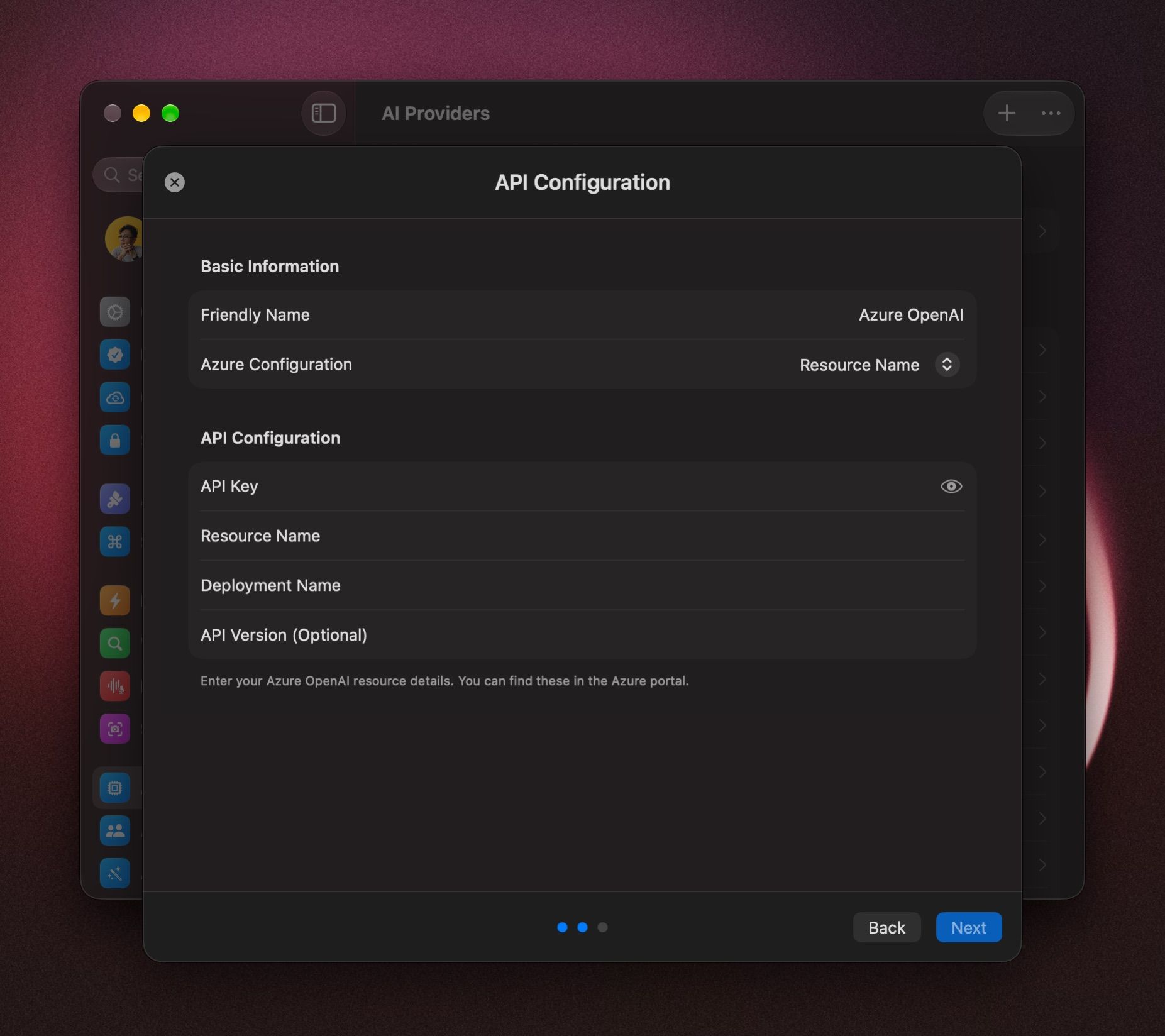
- Open Settings › AI Providers, click + and choose Azure OpenAI. It's under Other Providers.
- Leave Azure Configuration set to Resource Name.
- In Resource Name, enter your resource name. It's the part before
.openai.azure.comin your endpoint. - Paste your key into API Key.
- In Deployment Name, enter the name of your deployment.
- Leave API Version (Optional) empty, unless you need a specific version.
- Click Next.
Paste your deployment's URL instead
- Set Azure Configuration to Custom Base URL and click Import URL.
- Paste the full endpoint of your deployment, for example
https://resource.openai.azure.com/openai/deployments/deployment/chat/completions?api-version=…, and click Import. - Check the fields BoltAI filled in, add your API Key, and click Next.
Use Custom Base URL also when you reach Azure through a private gateway or proxy.
Add more deployments
Repeat the steps above for each deployment. Each one shows up as its own provider.
Start a chat with your Azure model
Click the model name in the message box, press ⇧ ⌘ M, or type /model. Under Azure OpenAI, pick your deployment.
To start every new chat with it, right-click the model and choose Set Provider & Model as Default. See Choose and switch models.
If it doesn't connect
- BoltAI couldn't verify this API key: copy the key again from your Azure OpenAI resource.
- BoltAI couldn't verify this Azure OpenAI setup: check Resource Name and Deployment Name against the Azure portal.
- If you see Retry without API Version, click it. Your endpoint doesn't support the version in API Version (Optional).
- On the provider's page, open the ⋯ menu and choose Test Connection.
Was this helpful?
Still need help? Ask the team